Git Workflow Cheatsheet
Keep production clean while developing across two machines. Three branches, one direction of flow: experiment on a feature branch, integrate on dev_branch (synced between your laptop and desktop), and release to main — the only branch your server ever pulls.
The mental model
| Branch | What it’s for | Who touches it |
|---|---|---|
main |
Stable, production-ready code | Deploy target only (e.g. an EC2 instance) |
dev_branch |
Everyday development and testing | Your laptop and desktop, kept in sync via origin |
feature/* |
Larger experiments, in isolation | Optional — branched off dev_branch |
One rule: changes only ever flow upward — feature/* → dev_branch → main. The server never commits; it only pulls main.
The flow at a glance
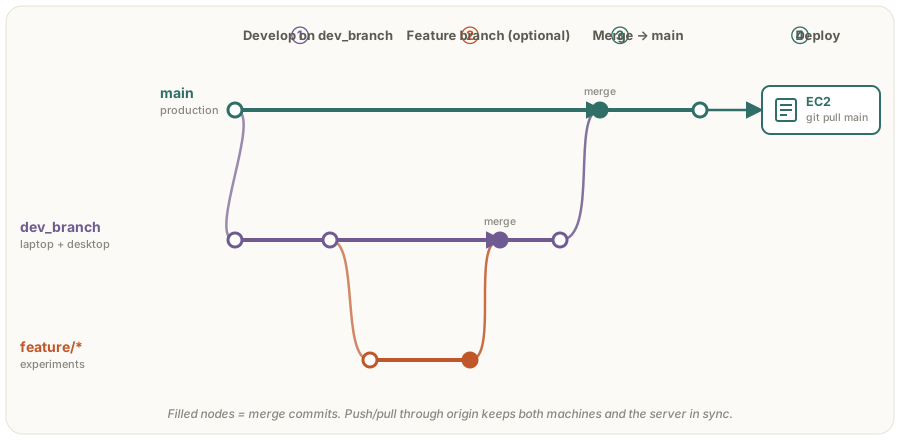
Everyday development
Run these on whichever machine you’re sitting at. Start every session with a pull so the two machines never drift.
| Step | Command |
|---|---|
| Switch to the dev branch | git checkout dev_branch |
| Get the latest work | git pull origin dev_branch |
| Stage your changes | git add . |
| Commit with a message | git commit -m "Describe your changes" |
| Share it back | git push origin dev_branch |
Feature branches (optional)
For anything large or risky, isolate it — then fold it back into dev_branch.
| Step | Command |
|---|---|
| Branch off dev | git checkout -b feature_name dev_branch |
| …do the work, commit as usual… | |
| Return to dev | git checkout dev_branch |
| Merge the feature in | git merge feature_name |
Release → deploy
When dev_branch is tested and you’re happy, promote it to main from your local machine, then pull it on the server.
On your laptop / desktop:
| Step | Command |
|---|---|
| Switch to main | git checkout main |
| Make sure it’s current | git pull origin main |
| Merge dev into main | git merge dev_branch |
| Publish main | git push origin main |
On the server (EC2):
| Step | Command |
|---|---|
| Switch to main | git checkout main |
| Pull the release | git pull origin main |
| Restart / reload | (your app’s restart step) |
First-time setup
Point a fresh local repo at its GitHub remote and push main once:
git remote add origin https://github.com/your-user/your-repo.git
git branch -M main
git push -u origin main
Remember: if it isn’t on main, it isn’t deployed. Keep dev_branch synced before you start, and let main stay boring.